From Hype to Reality: The Rise of GenAI and the Need for GenAIOps in Azure
Generative AI has taken the tech world by storm, transforming how we build and interact with applications, automate workflows and deliver user experiences. From Copilots to content generators, autonomous agents, multi-agent ecosystems, AI-powered search and many more, the landscape of GenAI-powered solutions is expanding at an unprecedented pace and they are becoming increasingly more capable.
The pace of innovation is relentless: new models, techniques and tooling emerges weekly, creating pressure on teams to adopt a modular, flexible approach that enables them to pivot quickly, integrate new capabilities, and avoid architectural lock-in. As a result, organizations are grappling with questions like:
- How do we monitor and govern GenAI behaviour in production?
- How do we manage the lifecycle of prompts, models, embeddings and other parameters?
- How do we evaluate model performance?
- How do we implement tracing, observability, and rollback mechanisms for GenAI workflows?
This is where GenAIOps comes into play - offering structure and best practices to streamline the development of GenAI applications. In this blogpost, we introduce the building blocks along with the Azure services that support the implementation of such a GenAIOps workflow.
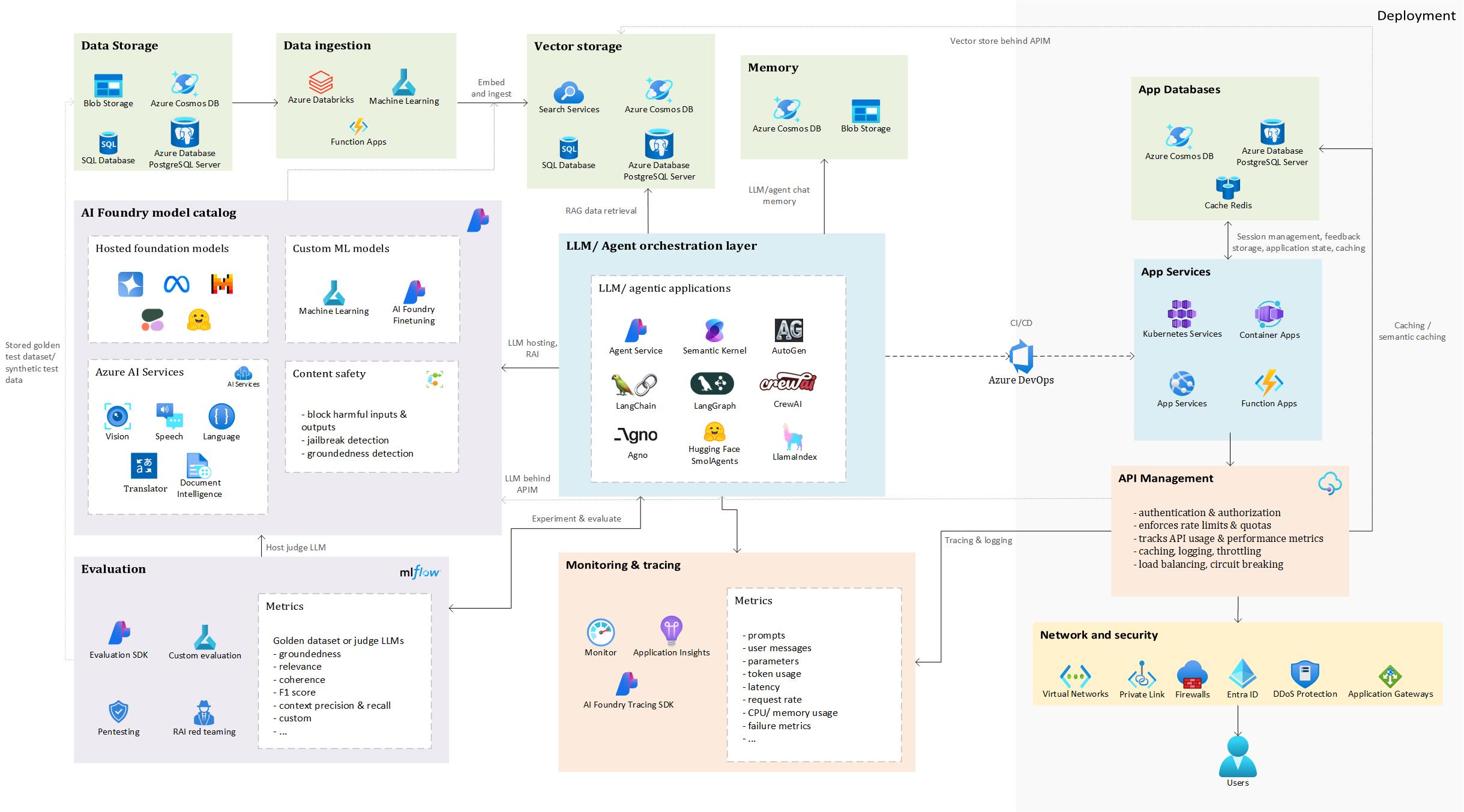 High-level architecture illustrating how different Azure services support the development, evaluation, and operationalization of GenAI applications
This architecture provides a foundation for applying GenAIOps principles, which will be explored further in this post.
As you can see, there are many building blocks and depending on use case, you might need or not need them. Thinking about a RAG application, vector databases will be a crucial part of your application, but they might not be required in, for example, summarization, language translation or classification use cases.
To walk through this architecture, let’s take a concrete example. And what better example than the omnipresent, arguably overhyped - but undeniably useful - RAG (Retrieval-Augmented Generation)?
⚠️ Disclaimer: This is a high-level overview. Each component in this architecture can be explored in much greater depth, and there are many design choices and trade-offs to consider. We’ll keep things simple here, but stay tuned for potential follow-up posts where we dive deeper into specific parts.
Data Storage
Let’s get started with an essential aspect of this use case: the grounding data. It is a classic case of garbage-in, garbage-out: feed your GenAI app a mess, and it’ll serve up polished nonsense with a straight face.
This grounding data can come from a variety of sources: internal documentation (PDF, Word, PowerPoint), knowledge bases (SharePoint, Confluence), CRM systems (Dynamic 365, SalesForce), ticketing platforms, product catalogs, public websites, SQL/NoSQL databases…
Data ingestion, processing & vector storage
Considering this as the raw source data, the next step before ingesting it into a vector database is processing. This is where the heavy lifting happens: extracting text, cleaning it, enriching it with metadata, and chunking it into meaningful units. Finally, the processed text is embedded into vector format, enabling semantic search to retrieve relevant context for your RAG application.
Text extraction is a particularly important step, especially when dealing with complex formats like PDFs, scanned documents, or files containing tables and mixed layouts. These formats often introduce noise, inconsistent structure, or missing context, which can degrade retrieval quality if not handled properly. Tools like Azure Document Intelligence can be extremely helpful here, as they support a wide range of document types and layouts (pre-built or custom), and can extract structured text and metadata without requiring separate flows for each format.
Once text has been extracted and cleaned, the next step is choosing the right vector database and data format for ingestion. Azure offers several options, with Azure AI Search standing out for its advanced hybrid search capabilities: combining full-text, vector search and semantic reranking. However, other databases such as Azure SQL DB, PostgreSQL, and Cosmos DB now also support vector search. These alternatives can be more cost-efficient and operationally simpler, especially when your data already resides there, eliminating the need for data movement.
At this stage, it’s important to carefully design your index structure. For Azure AI Search, this includes deciding which fields should be searchable, retrievable, filterable, or sortable, as these choices impact index size and performance. You’ll also need to determine which fields should be vectorized - typically those containing rich, semantic content like document bodies, summaries, descriptions or titles.
With the core fields now being defined, next, it is useful to consider what metadata to include. Metadata not only enables contextual filtering and personalization, but also supports traceability: for example, storing the source URL, page number, or document ID helps users understand where the information came from. This is notably valuable in enterprise and compliance-focused scenarios, where sourcing and transparency matter.
Once the index structure and vector database have been decided, we can begin the ingestion process. As shown in the diagram, we use AI Foundry to host the embedding model that will vectorize the cleaned text data. This could be an Azure OpenAI embedding model, or alternatives like Cohere or Hugging Face models such as sentence-transformers. For a comparison of model performance, check out the MTEB leaderboard.
💡 Note: Choosing an embedding model involves a trade-off between retrieval accuracy, latency, and costs. Larger models generally yield better semantic understanding and retrieval performance, but may result in higher latency, increased computational overhead, and larger storage requirements in your vector database.
A critical step during ingestion is chunking: splitting documents into smaller, semantically meaningful units. Getting this right is essential for improving retrieval accuracy in vector search. The optimal chunking strategy often requires experimentation: chunks can be defined by character count, document structure (e.g., paragraphs, headers, tables), HTML tags (for web content), or even semantic boundaries. For code, it’s important to keep logical units like functions or classes together.
⚖️ Trade-off: Smaller chunks tend to be more specific, hence improving retrieval precision, but may lack sufficient context for the language model to generate coherent answers. Larger chunks offer richer context, but risk mixing unrelated topics, which can reduce search accuracy. Finding the right balance is key to building an effective RAG pipeline.
Typically, this entire ingestion process is orchestrated via code, using tools that support automation and scalability. Common choices include Azure Machine Learning pipelines, Databricks workflows, or Azure Functions for event-driven execution. Depending on the architecture, other Azure services like Azure Data Factory or Logic Apps can also be used to coordinate data movement, transformation, and embedding. The goal is to build a repeatable and maintainable pipeline that can handle updates, scale with data volume, and integrate with downstream RAG components.
LLM/Agent orchestration
This component forms the core logic of your GenAI application, determining the sequence of steps taken by the LLM or other functions to produce a final result. In a simple RAG setup, the user query is used to retrieve the k most relevant chunks from the vector database. The number of chunks retrieved is another parameter to be tuned through experimentation and will vary based on the use case. There is a trade-off to consider when choosing this k: higher k will provide a richer context, which can help the model generate more complete answers, however, at the risk of introducing irrelevant information confusing the model, while adding to token usage and higher latency. On the other hand, choosing a lower value of k might result in a more focused and relevant context while reducing latency and token cost, but may not provide sufficient context for the model to respond accurately and completely. These chunks are then passed into the LLM’s context along with the original query, allowing the model to generate a grounded response, reducing the risk of hallucinations.
In more advanced agentic applications, the flow may involve multiple tools and agents. For example, a web search agent might gather external information, a retrieval agent could query internal sources, and a writer node might summarize the findings to answer the user’s question. These flows can follow a predefined sequence of steps for maximum control, or dynamically determined by an LLM, such as routing a request to the most suitable agent based on intent. While dynamic workflows offer flexibility, they may sacrifice execution control and introduce the risk of incorrect or suboptimal execution paths being followed.
There are multiple open-source frameworks available to orchestrate GenAI applications, as shown in the diagram. This is not an exhaustive list, many other options exist.
As users increasingly prefer chat-based interfaces, attaching external memory to the LLM or agent becomes essential to maintain context across interactions. This allows users to resume conversations seamlessly, even after leaving and returning later. A common approach is to use Cosmos DB or similar storage solutions to persist previous user messages, system responses, and relevant metadata.
This memory can be used to:
- Reconstruct conversation history
- Personalize responses based on past interactions
- Maintain long-term context across sessions
Depending on the architecture, other Azure services like Azure Table Storage, Blob Storage, or SQL DB can also be used to store chat history.
AI Foundry Model Hosting
The LLMs used in your GenAI application can be hosted in AI Foundry. You can choose from pre-hosted models such as Azure OpenAI, Mistral, Meta’s Llama, or Hugging Face models, or opt to fine-tune custom LLMs using AI Foundry’s built-in capabilities or by developing custom fine-tuning code in Azure Machine Learning.
In addition to the hosted foundation models, AI Foundry integrates various Azure AI Services that can enrich your application: for example, Translator for multilingual support, Speech for voice input/output, Document Intelligence for structured document extraction, and Vision for image analysis and OCR.
To ensure safety and robustness, Content Safety is enabled by default on hosted LLMs. Its filters help detect and block harmful, offensive, or unsafe inputs and outputs, prevent jailbreak attempts, and assess the groundedness of responses, ensuring that generated content is based on retrieved or known sources. These filters operate across categories such as violence, hate, sexual content, and self-harm, and can be configured with sensitivity levels (e.g., low, medium, high) to match your application’s risk tolerance and audience.
While these protections are powerful, it’s important to complement them with application-level safeguards, such as prompt design, user access controls, and human-in-the-loop review processes, especially in high-risk or regulated environments.
Evaluation
Once all components of the orchestration layer are in place, the next critical step is evaluation. For RAG applications, performance hinges on a variety of factors, including chunk size and strategy, the embedding model and LLM used, data extraction techniques, search modes (vector, hybrid, semantic reranking), metadata filtering, the system prompt, and others. To assess which configuration performs best, we must first define consistent evaluation metrics.
Ideally, if possible, this evaluation is grounded in a golden dataset - one that includes a set of test questions, preferred answers, and the corresponding documents or document chunks that should be retrieved. This allows us to evaluate both the quality of the generated answers and context retrieval process. Since the answers are in free-text form, automated evaluation can be approached in two ways: using traditional NLP metrics like METEOR, ROUGE and others, or leveraging an LLM as a judge to compare and score the generated answers against the ground truth.
While the traditional NLP metrics like ROUGE or METEOR offer a basic benchmark, they often miss nuances like semantic meaning or factual accuracy. LLM-based evaluation provides deeper, context-aware insights, though at a higher computational cost.
Azure AI Foundry provides an Evaluation SDK that supports this process. It includes a set of predefined metrics and supports custom metrics, that can be tracked using MLflow and visualized in the UI, enabling easy comparison between different experiments. The predefined metrics sometimes require a golden dataset, but others, such as groundedness, relevance and coherence, can be assessed without one.
Furthermore, Azure AI Foundry includes a Simulator package that helps generate synthetic datasets when real annotated data is not available. This package can produce realistic question-answer pairs along with relevant context documents, allowing to simulate evaluation scenarios and test model performance. These synthetic datasets are helpful for prototyping and benchmarking, and they can be customized to reflect specific domains or complexity levels.
Beyond performance, evaluation must also address the security and robustness of the application. This includes penetration testing (pentesting) and Responsible AI (RAI) red teaming. Pentesting helps uncover vulnerabilities such as unauthorized access to sensitive data, injection attacks, and insecure data flows, ensuring the application meets security standards. RAI red teaming, on the other hand, focuses on ethical and safety risks, such as biased outputs, toxic or harmful content, hallucinations, misinformation, and privacy violations. These risks are particularly relevant in RAG systems, which expose new attack surfaces through APIs, vector databases, and tool integrations.
To facilitate the RAI red teaming, the AI Red Teaming Agent can simulate attacks, such as prompt injection and some encoding tricks, to expose vulnerabilities in GenAI models and provide metrics and reports to guide safer AI deployment.
Monitoring and tracing
In GenAIOps, tracing and monitoring are foundational for ensuring reliability, performance, and transparency across AI-driven applications. As systems become increasingly complex -especially with multi-agent orchestration and RAG pipelines - observability becomes not just helpful, but essential.
Azure AI Foundry integrates with Azure Application Insights, leveraging OpenTelemetry to capture detailed traces of AI workflows. These traces can be viewed directly in the UI, offering a clear, step-by-step view of the entire execution path, from initial prompt to final output.
In multi-agent systems, this means you can amongst others inspect:
- Agent invocation sequences
- Inputs and outputs per agent
- Prompts and LLMs used
- Token usage and latency
- Documents retrieved in RAG scenarios
- Tool calls and their results
This observability not only simplifies debugging and performance optimization, but also enhances transparency by making it easier to understand how decisions were made and how the system arrived at a particular result.
Tracing of course is not limited to AI-specific components, Azure Application Insights also captures traditional application telemetry such as latency and throughput, CPU and memory usage, failed requests and exceptions, dependency maps and bottlenecks and such.
Consequently, it enables performance tuning by identifying slow agents or expensive prompts, cost optimization through token usage analysis, alerting and automation with thresholds on error rates, response times and resource usage.
App Services
Once the orchestration has been thoroughly tested, performance optimized through targeted experiments, and the application has undergone rigorous security, ethical, and safety assessments, we can proceed to deployment. Monitoring and tracing mechanisms should be in place to ensure visibility into the app’s behavior and performance. When we’re confident in the stability and readiness of the GenAI application, it’s time to make it available for user testing.
Using Azure DevOps and CI/CD pipelines, we can automate the deployment process and push the application code to a suitable Azure hosting service. These pipelines are especially valuable when managing deployments across multiple environments: from development to testing to production - ensuring consistency, traceability, and reduced manual effort. Depending on the architecture, existing internal policies and requirements of the app, deployment targets could include:
- Azure Web Apps: for straightforward web-based applications.
- Azure Container Apps: for microservices or containerized workloads.
- Azure Kubernetes Service (AKS): for complex, scalable container orchestration.
- Azure Functions: for serverless execution of lightweight, event-driven components.
App Databases
These backend data services, which are typically connected to Azure App Services, play a crucial role in enabling responsive and scalable user experiences. One of their roles is as feedback storage, where user input is continuously collected and stored to help refine the GenAI application’s performance and improve the overall user experience. This data can be used to identify patterns, tweak responses and guide future development.
They also support session management, particularly in chat-based interfaces, by maintaining conversational state across interactions. This allows users to resume previous conversations, retain context and deliver more personalized, coherent responses over time – essentially providing a form of long-term memory.
Additionally, these services facilitate (semantic) caching. By caching model responses and user queries, the system can reduce latency, improve throughput and lower operational costs - since previously generated answers can be reused without invoking the LLM again. Semantic caching goes a step further by recognizing similar queries and reusing previously generated responses, even if the input is not identical.
API Management
Finally, once the web application has been deployed, it is typically placed behind Azure API Management (APIM) to provide a secure and scalable interface for interacting with backend services. APIM acts as a centralized gateway that abstracts the complexity of service endpoints and introduces a layer of governance and control.
At its core, APIM handles authentication and authorization, ensuring that only verified users or systems can access the APIs. This is critical in environments where sensitive data is exposed. It also enforces token limits and quotas, helping to prevent abuse and ensure fair usage across consumers, which is necessary when exposing the app to multiple teams, departments or external users. Moreover, token consumption can be tracked across applications or API consumers, which could be useful for chargeback scenarios, capacity planning and monitoring.
To support observability, APIM integrates with Azure Monitor, allowing teams to track API usage patterns, performance metrics, and error rates. These insights are essential for maintaining operational health and optimizing resource allocation.
APIM also supports semantic caching by integrating with Azure Managed Redis/ Redis Enterprise, storing and retrieving semantically similar prompt completions from cache, resulting in reduced token consumption and improved response performance.
Operational resilience is further enhanced through features like logging, throttling, load balancing, and circuit breaking. Logging provides detailed traces for debugging and auditing such as token usage per request, name of model used and optionally request and response messages, while throttling and load balancing help manage traffic spikes and distribute requests efficiently, for example across multiple Azure OpenAI service endpoints. This means that PTU deployments could be prioritized with a fallback to pay-as-you-go models. Lastly, circuit breaking protects the system from cascading failures by temporarily halting calls to unresponsive endpoints.
Finally, APIM is closely integrated with the network and security layer, which plays a key role in securing and managing access to GenAI applications. The exact configuration of this layer depends on the organization’s existing cloud architecture, internal policies, and whether the application is intended for internal use or exposed externally. Common components include Virtual Networks, private endpoints, and firewalls, which help enforce secure communication and access control. Depending on the use case, services like Azure Application Gateway (for web traffic routing and WAF protection), Azure Front Door (for global load balancing and SSL offloading), or Traffic Manager (for DNS-based routing across regions) can be used to optimize performance and availability. These tools help manage traffic efficiently, protect against threats, and ensure that users experience reliable interactions with your GenAI app. Together with APIM, they form a flexible and secure foundation for deploying GenAI solutions at scale.
We have now covered the main building blocks of a GenAIOps workflow, using this high-level architecture to show how different Azure services can come together to support GenAI in production. Of course, there is much more to each component than what we touched upon here. Every part, from data processing, to orchestration, evaluation, deployment and integration within the existing ecosystem comes with its own set of decisions, trade-offs and design considerations. Depending on your organizations’ cloud setup, policies, use cases and maturity level, the implementation might look quite different. This architecture is meant to be a starting point, something to build on and adapt as you GenAI journey evolves. Whether you are just looking to get started or are maybe ready to scale, having a structured approach in place can help bring clarity and control to the process.